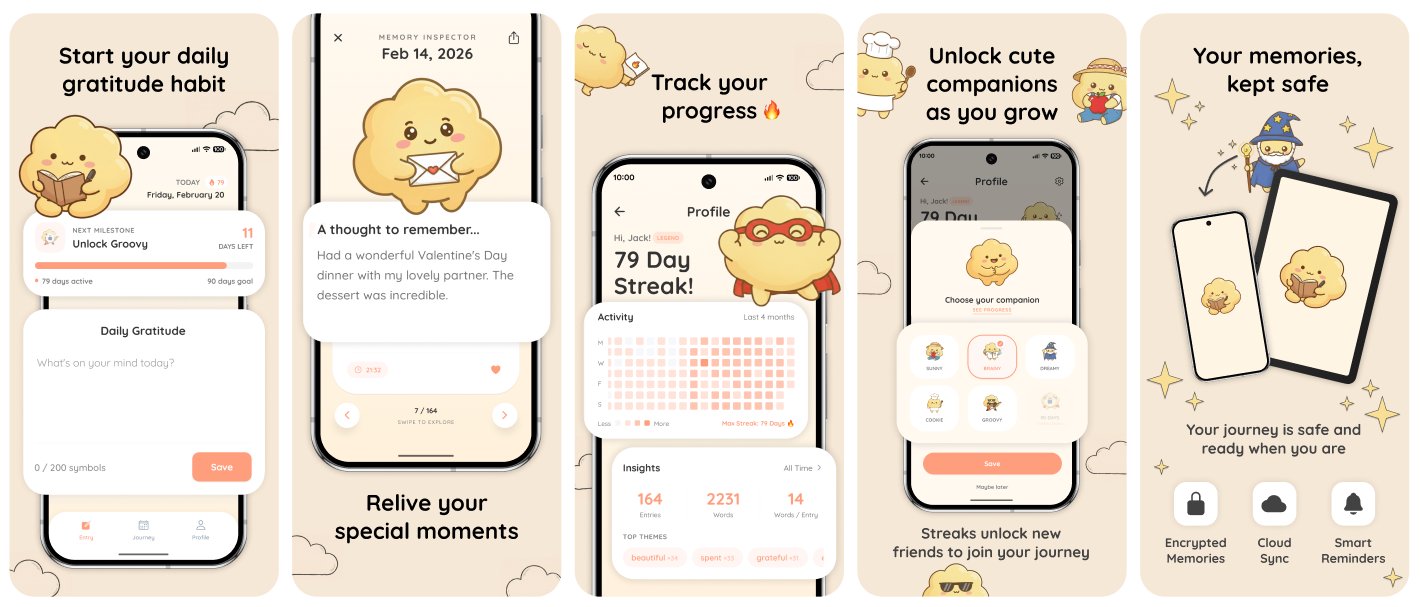
You Released An App. Now What?
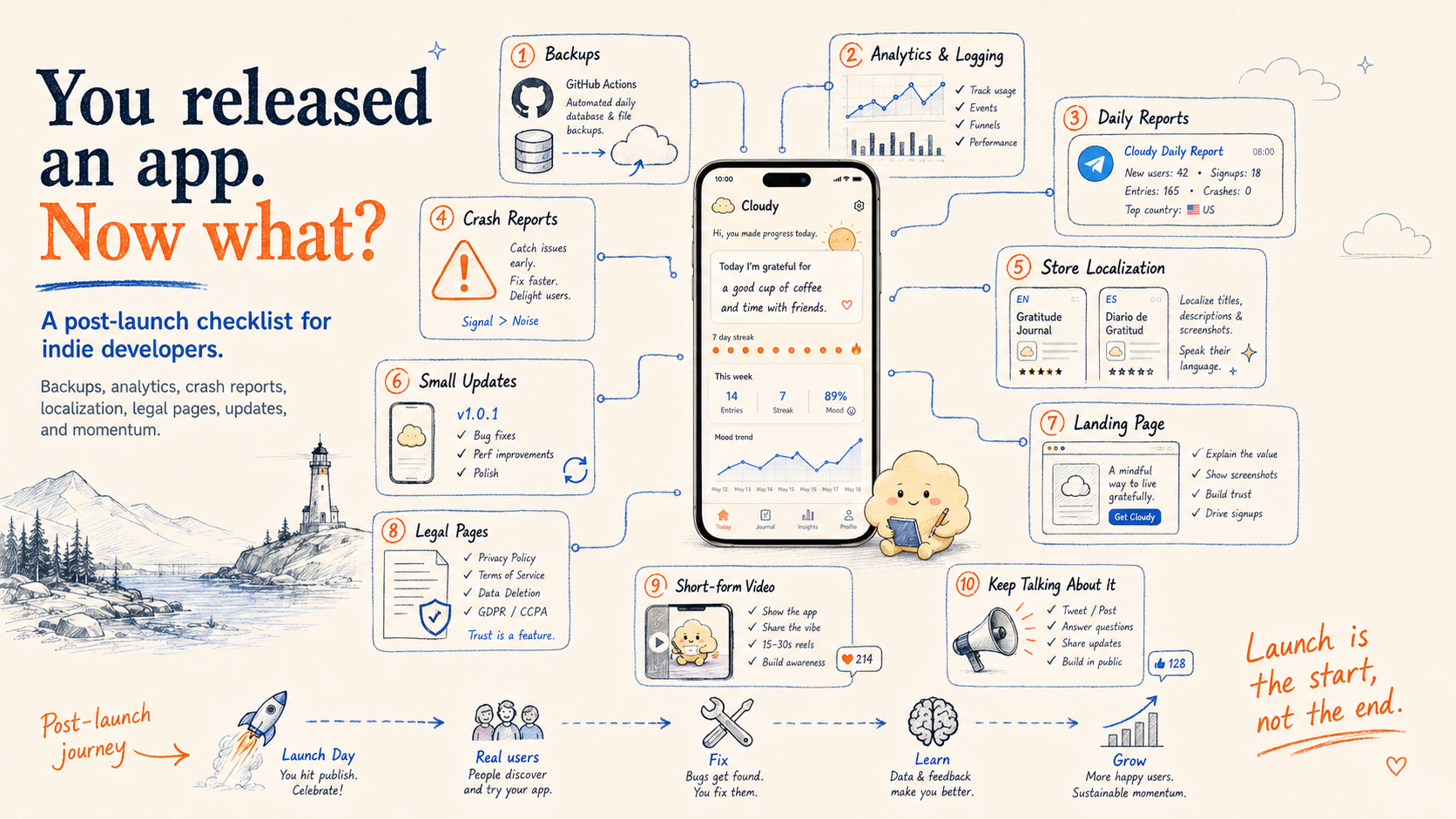
A structured 10-step post-launch checklist for indie developers: backups, analytics, crash reports, store localization, marketing, legal pages, and release momentum.
Publishing your app feels like a finish line.
But in reality this is just the beginning.
When I launched Cloudy, my gratitude journal app, I quickly learned that launch day is not the final boss. You hit publish, refresh the store page, send the link to a few friends, maybe post about it, and then suddenly the app is no longer just a project on your machine.
It is alive. Real users can open it. Real bugs can happen. Real feedback can show up. Real data starts coming in.
In the first month, I saw one crash report. That would have been easy to ignore. But that one crash was one real person hitting one real wall, so I fixed it. That moment taught me more about the post-launch mindset than the launch itself.
After you release an app, your job changes. You are no longer only the builder. You are also the maintainer, analyst, marketer, support person, QA tester, privacy department and everything else.
That sounds like a lot, but it does not have to be chaos. Here is the post-launch checklist I wish more indie developers treated seriously.
Quick Navigation
- Quick Navigation
- 1. Set Up Backups Before You Need Them
- 2. Add Analytics \& Logging
- 3. Create Simple Daily Reports
- 4. Check Crash Reports
- 5. Localize Your Store Screenshots
- 6. Ship Small Updates Often
- 7. Build A Landing Page
- 8. Sort Out Legal Pages Early
- 9. Make Short-Form Videos
- 10. Keep Talking About Your App
- Final Thought
1. Set Up Backups Before You Need Them
Backups are not exciting. Nobody launches an app and thinks, "You know what would make this moment cinematic? A scheduled database export."
But backups matter.
I use Supabase, and on the free tier, automated backups are not included. That makes sense for the business, but it leaves you responsible for your own backup plan.
So I set up backups with GitHub Actions.
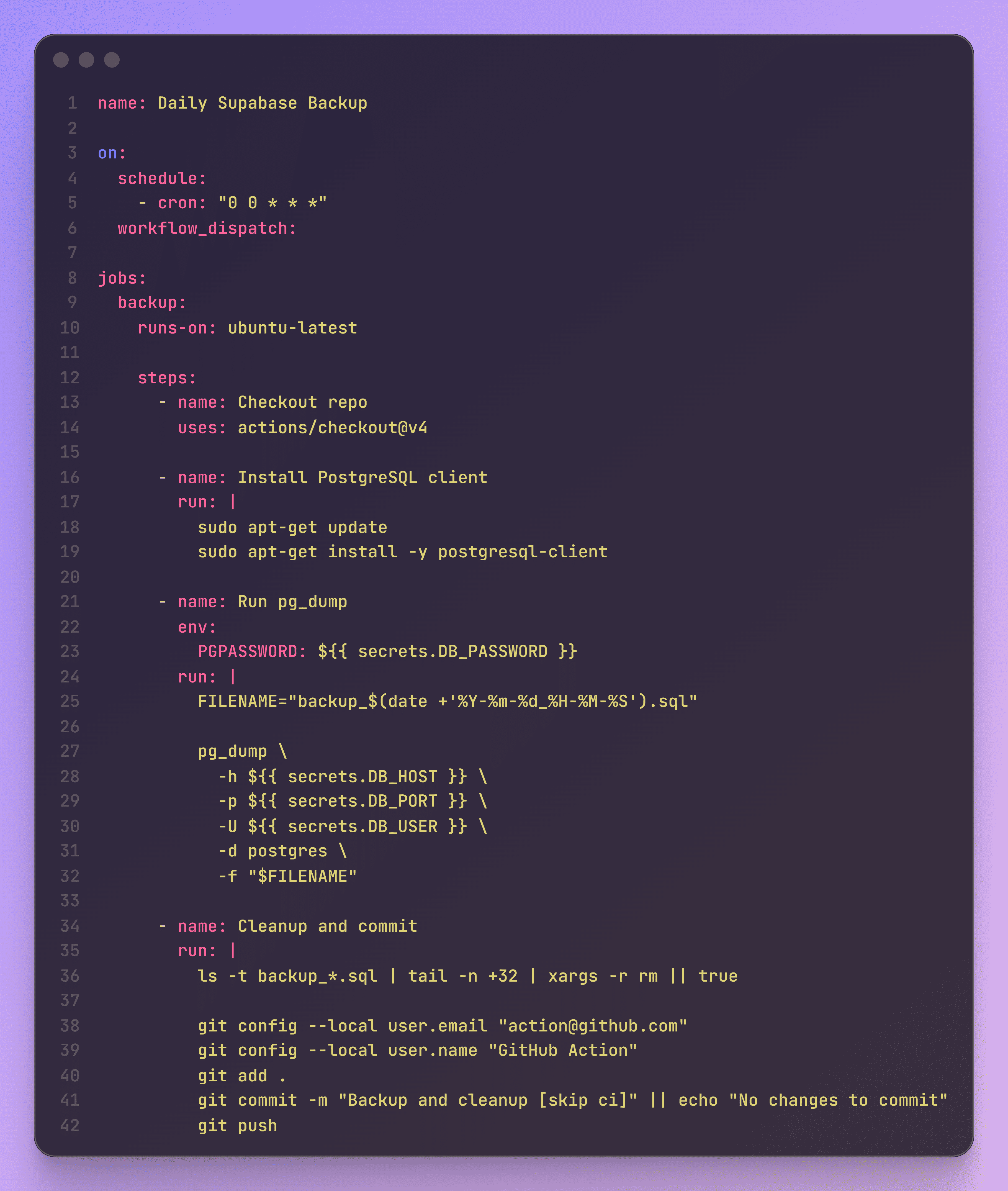
GitHub Actions are useful here because they are free for many small projects, already live close to the codebase, and are easy to schedule. You can create a workflow that runs every day, exports what you need, and stores it somewhere safe.
A basic backup flow can be enough:
- Run a scheduled GitHub Action.
- Export your Supabase data.
- Store the export somewhere private and safe.
- Get notified if the job fails.
If you store backups in GitHub, make sure the repository is private. A backup is not helpful if you accidentally turn it into a public data leak.
Is this the fanciest setup in the world? No. Does it work? Yes.
After launch, you do not always need perfect systems. You need systems that save you when something breaks at 1:37 AM and your brain is made of soup.
2. Add Analytics & Logging
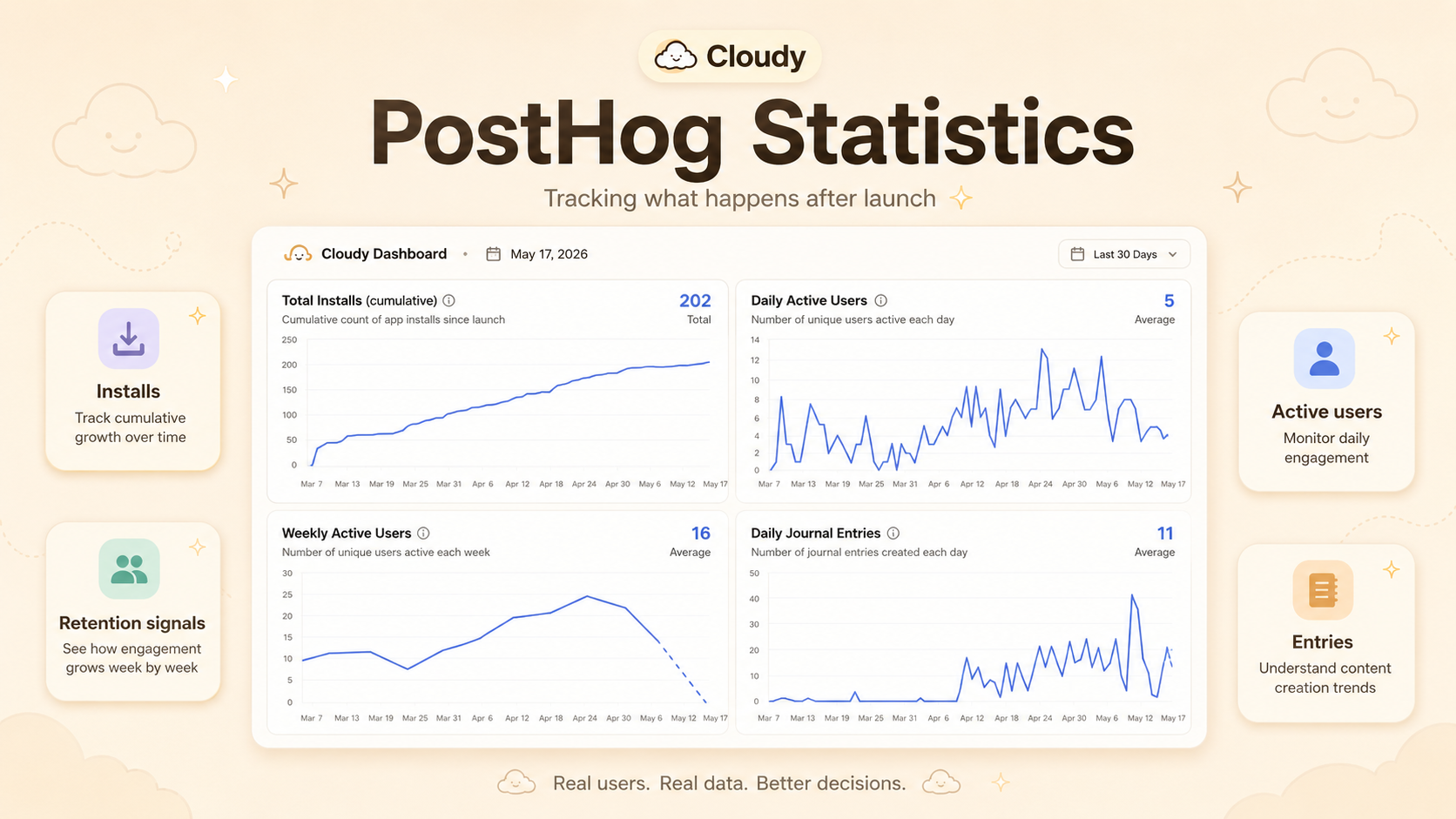
Once people can use your app, analytics stop being a "nice to have" and become a necessity.
I use PostHog for product analytics so I can understand how the app is doing.
- Are people opening the app?
- Are they using the core features?
- Are they coming back?
- Where are they dropping off?
- Which screens or flows are confusing?
Before launch, you make a lot of guesses.
You guess which feature matters. You guess what users will tap first. You guess which screen makes sense. You guess where people might quit.
After launch, you can check.
Not every product decision should become a spreadsheet debate. Keep the app human. If users keep opening one feature and ignoring another, or if they start a flow and never finish it, that tells you something.
For errors and logs, tools like Sentry are also worth setting up early. Future you will be very grateful when something breaks and you have enough context to understand why.
3. Create Simple Daily Reports
One of my favorite small things I built after launch was a daily report.
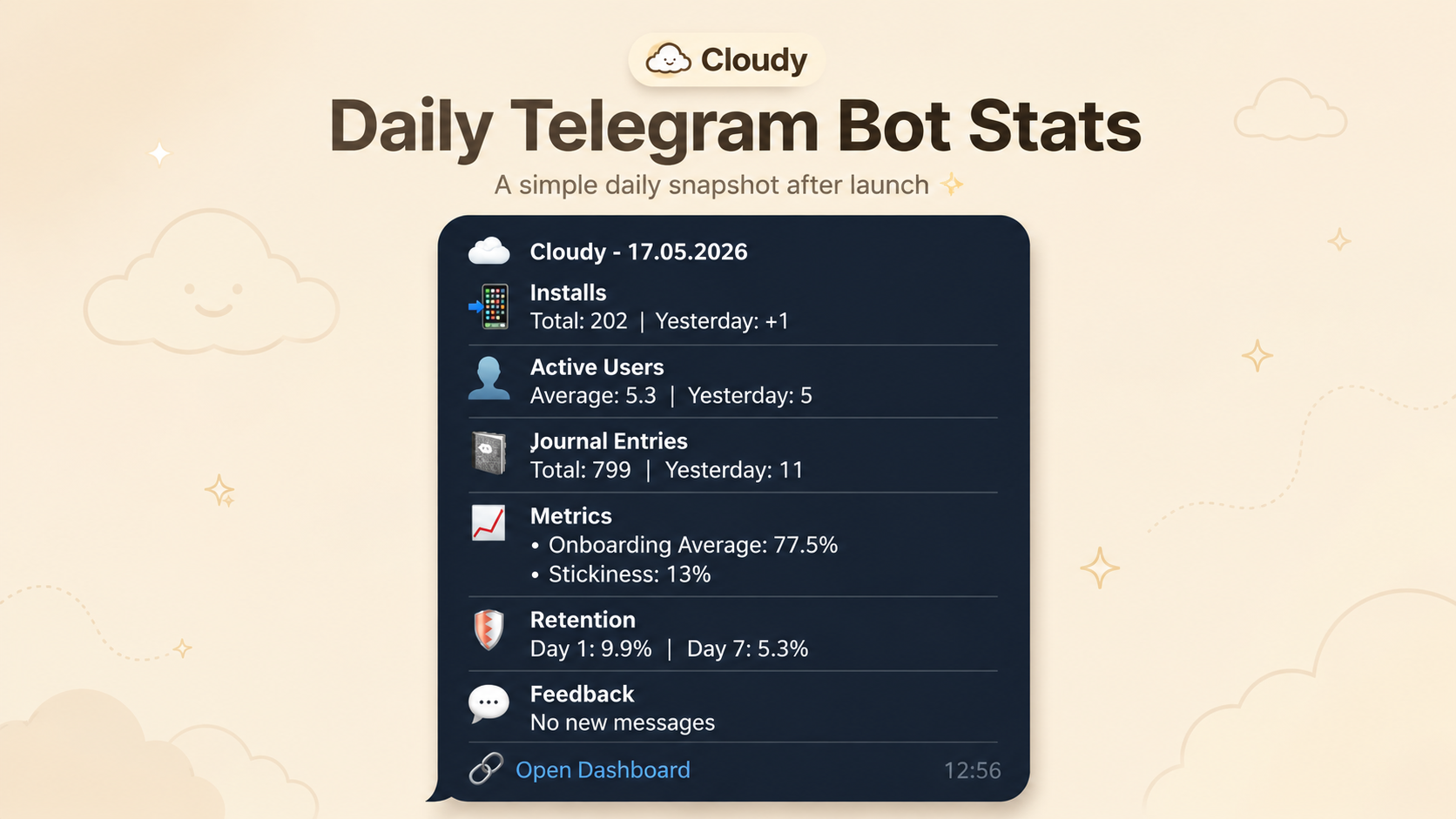
I created another GitHub Action that pulls data from PostHog and sends me a Telegram bot message with a short daily summary.
Nothing dramatic. Just enough to know what is going on.
Downloads are nice, but usage matters more. Are people coming back? Are they triggering key events? Did anything unusual happen? Did yesterday look better than today?
The great thing about a daily report is that it turns analytics into a habit. You do not need to open five dashboards every morning like some Wall Street trader with an app instead of stocks.
You just get a message.
It becomes a small ritual: coffee, phone, daily report.
"Okay, cool, people are using this."
Or:
"Hmm, something changed. Let me check."
That feedback loop keeps the project alive in your head. When you are an indie developer, nobody is tapping you on the shoulder saying, "Hey, remember to check retention." So build little systems that tap you on the shoulder.
4. Check Crash Reports
Google Play Console is not decoration.
One day I checked it and saw one crash report.
Just one.
It would have been easy to ignore. One crash does not sound like a disaster. On paper it is small, but it still points to a real user problem.
But that one crash was still a real user hitting a real problem. So I opened it, checked what happened, and fixed it.
That is the mindset you need after launch.
Not panic. Not obsession. Just awareness.
Your app is now out in the wild. It is running on phones you do not own, in languages you may not speak, with network conditions you did not test, on devices that somehow still exist even though they feel like they were built during the Roman Empire.
Things will break.
Check these regularly:
- Google Play Console or App Store Connect.
- Crash reports.
- ANRs.
- Reviews.
- Support emails.
- Analytics drops.
- Weird user behavior.
Small issues have a funny way of becoming big issues if nobody looks at them.
Fixing bugs quickly sends a signal too. Maybe users do not consciously think, "Wow, this developer maintains a strong release cycle." But they feel it when the app improves. They feel it when the app does not stay broken.
Do not be lazy with crash reports. Even if only one user hit the bug, that user still matters.
5. Localize Your Store Screenshots
Your app store screenshots are not decoration.
They are your sales pitch.
I translated every screenshot on Google Play into 10 languages. But I did not just translate the text and call it a day. I localized the names, examples, and cultural context inside the screenshots too.
For example, if a screenshot shows a user name and example content, I do not want every country to see the same generic English version.
For Germany, using a name like Lukas can feel more natural than leaving everything in English. For Russia, using a name like Ivan can do the same. These tiny choices make the store page feel less copied and pasted.
I saw a bump in downloads in specific countries after these changes.
Translate these things:
- Names.
- Examples.
- Cultural references.
- Date and number formats.
- Text length and layout.
- The emotional signal that says, "This app was made for people like me too."
You do not need a huge team for this. Start simple:
- Translate the store listing.
- Translate screenshots.
- Adjust names and examples.
- Check that longer languages do not break your layout.
- Make sure the UI still looks good in languages like German or Finnish.
Is it tedious? A bit. Is it worth it? Absolutely.
6. Ship Small Updates Often
After launch, momentum matters. I released an update that fixed some UI elements and handled streak freezes. Now I am working on a widget.
That is the rhythm:
- Release.
- Watch.
- Fix.
- Improve.
- Release again.
Not every update needs to be a giant feature with fireworks and a launch video. Some updates are small. Some are cleanup. Some fix the annoying thing you noticed but hoped nobody else would see.
Spoiler: someone saw it.
A living app feels different from an abandoned one. Users may not read every changelog, but they notice polish. They notice fewer bugs. They notice when the app slowly becomes smoother, clearer, and less clunky.
Small updates are good for you as a builder too. They keep the project moving. They stop the codebase from becoming that dusty drawer in the kitchen where batteries, receipts, and mystery keys go to die.
7. Build A Landing Page
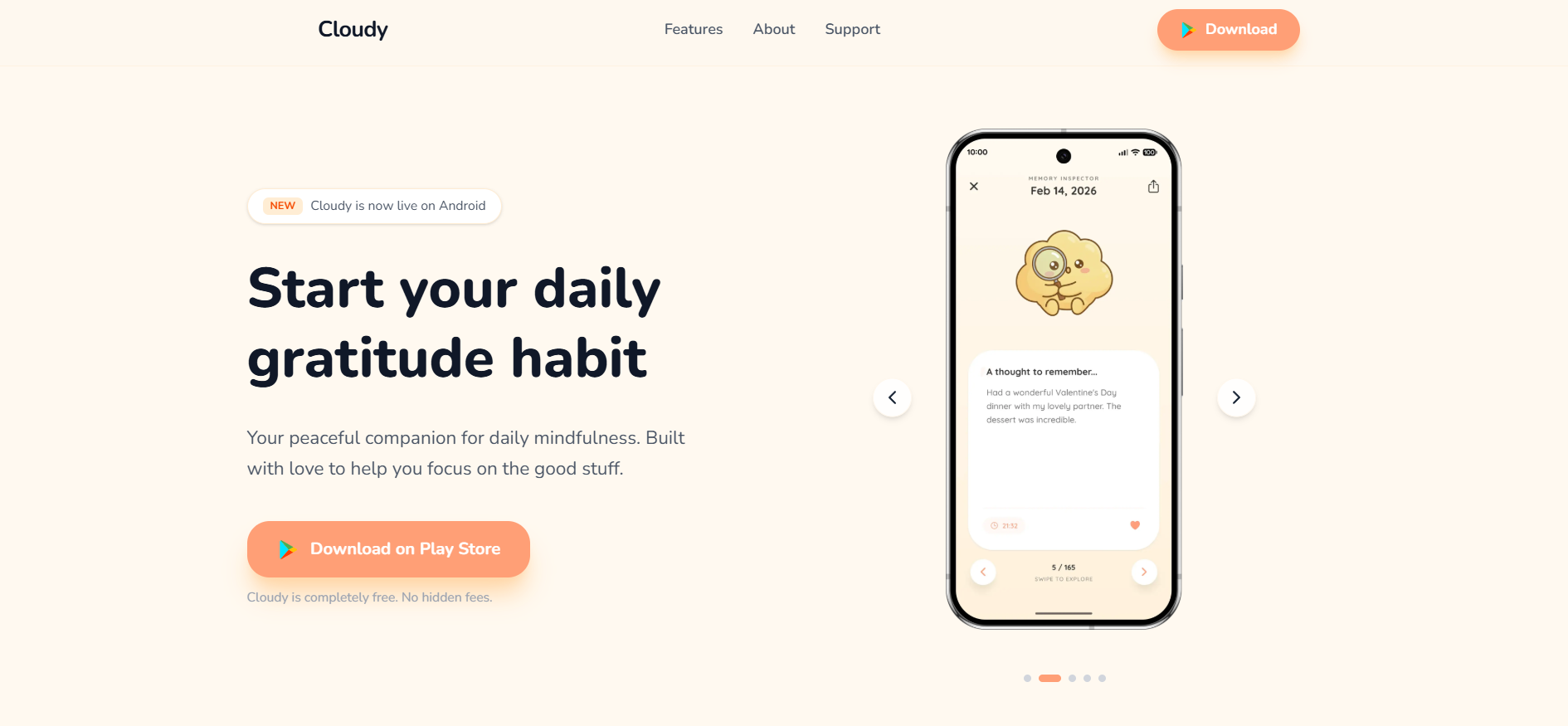
Your app needs a home outside the store.
A landing page makes the app feel more real. It gives people a place to learn what it does, see screenshots, read updates, find legal pages, and contact you.
It does not need to be a massive site. A simple page is fine.
Include:
- A clear headline.
- A short explanation.
- App store links.
- Screenshots or a demo video.
- Contact info.
- Privacy policy.
- Terms, if needed.
- Data deletion instructions.
The landing page is also useful for SEO, social links, press, and support. If someone Googles your app, you want them to find something you control.
Set up the basics:
- Google Search Console.
- Vercel Analytics or another simple analytics tool.
- Metadata for social previews.
- A clean mobile layout.
And please, make it look decent on mobile. It is an app. Most people will check it from a phone.
8. Sort Out Legal Pages Early
Nobody launches an indie app because they are excited to write a privacy policy.
But you need one.
Make sure your app and landing page have the right legal pages:
- Privacy policy.
- Terms.
- Cookie notice, if needed.
- Contact details.
- Data deletion instructions.
- Anything required by your platform or region.
Also think about GDPR and similar privacy rules.
If users can create an account, they should be able to delete their data. Do not hide that behind a treasure map. Add a delete data button or clear instructions.
This stuff is easy to postpone because it does not feel like "real product work." Still, it is real product work.
Trust is part of the product. Safety is part of the product. Compliance is part of the product.
And yes, it is boring.
That is fine. Some parts of running an app are boring. Boring can be good. Boring means fewer angry emails later.
9. Make Short-Form Videos
Here is the part many developers hate.
You have to talk about the app.
I know. It feels weird. You built the thing. Should people not just find it?
Sadly, no.
If you have a marketing budget, great. Run ads. Test creatives. Try Google App Campaigns, Meta ads, TikTok ads, or whatever fits your audience. Paid acquisition can work if you understand your numbers.
But if you do not have a marketing budget, you still have options. The work just gets scrappier.
Go on Instagram. Go on TikTok. Watch what is trending. Study Reels and short-form video formats. See what structures people already react to. Then recreate the structure with your app.
Do not copy the video exactly. Copy the pattern.
A simple short video can include:
- A clip of you using the app.
- A strong caption.
- A quick shot of your face reacting to something.
- A trending song.
- One clear reason someone should care.
Most videos will not work.
That is normal.
But one video can change everything. One video hitting 1 million views can turn into thousands of downloads overnight. Maybe it becomes 1,000 downloads. Maybe 10,000. Maybe more, maybe less, depending on the app, audience, and clarity of the video.
The point is not "go viral or fail." That is a terrible mindset.
The point is this: distribution is part of the product now.
You can build the cleanest app in the world, but if nobody hears about it, it is like opening a great coffee shop in the middle of a forest. Nice latte art. Zero customers. Occasional squirrel.
10. Keep Talking About Your App
I made one mistake with Cloudy: I started building in public only after I released it.
I should have started earlier.
Still, even in just a few days, I got more than 10 followers by talking about what I was building. It is a small number, but it is real. And it came from simply posting.
People like following progress. They like seeing messy middle parts, not just polished launch posts. They like bugs, charts, lessons, tiny wins, and honest "I tried this and it did not work" updates.
Building in public does not mean turning your whole life into content. It does not mean posting fake hustle threads or pretending every small decision is a founder masterclass.
It can be simple:
Fixed one crash today.
Localized screenshots into 10 languages. Took longer than expected.
Set up daily analytics reports through Telegram.
Working on a widget now.
Streak bug is fixed. Finally.
Keep posting. Keep talking. Keep showing the process.
Use LinkedIn, X, Reddit, TikTok, Instagram, communities, and anywhere your potential users might exist. Every person is a potential user. Every user is a potential customer.
Followers are not the only goal. Attention compounds too. Someone sees one post, then another, then another. Eventually they remember the app. Maybe they try it. Maybe they tell someone. Maybe they just cheer you on, which sounds small until you have spent three hours fighting a weird Android bug and need one human being to say, "Nice work."
Final Thought
The app is live now. Real users. Real bugs. Real feedback.
That is what it means to own a release from idea to execution, all the way.
After launch, do not vanish. Do these things:
- Set up backups.
- Add analytics and logging.
- Create simple daily reports.
- Check crash reports.
- Localize your store screenshots.
- Ship small updates often.
- Build a landing page.
- Sort legal pages early.
- Make short-form videos.
- Keep talking about your app.
None of this guarantees success. Apps are hard. Distribution is hard. People are busy, picky, distracted, and already drowning in icons on their home screens.
But doing these things gives your app a real chance.
And honestly, that is the part you can control.
You released the app. Now keep going.